
Seedling Learning fully supports the ADA Title II regulations taking effect this April, which require K-12 districts and universities to meet WCAG 2.1 Level AA accessibility standards for digital content. As designers of interactive and game-based learning experiences we are committed to content that is accessible, effective, and enjoyable. For us, compliance is the floor, not the ceiling.

The challenges for game-based and interactive learning content
Digital accessibility guidance typically focuses on websites and documents, where WCAG provides a solid baseline focusing on contrast ratios, readable fonts, keyboard navigation, screen reader compatibility. But when your content includes animated characters, drag-and-drop interactions, timed challenges, and audio feedback, that baseline is insufficient. The regulations offer little guidance on highly interactive resources. How do you design a moving-sprite activity that doesn’t overwhelm a learner with ADHD? How do you make a drag-and-drop task workable for someone with motor impairments? How do you introduce sound effects that support rather than disrupt learning? These are the questions we set out to answer.
What we are doing differently
The elements that make a learning activity game-like and engaging are often the same ones that create access barriers. We have built our accessibility strategy around nine learner personas, each representing a distinct set of access needs: low vision, blind, motor impairment, autism, ADHD, dyslexia, deaf or hard of hearing, low literacy or multilingual, and the teacher or facilitator configuring content for a diverse group. For each persona, we have identified the specific barriers that game-based interactivity creates and designed responses into the activity at architecture level.
The result is a set of five conditions we design for in every activity: High-Contrast, Reduced Motion, Low-Stimulation, Reduced Audio, and Keyboard/Alternative Input. Every learner is offered an accessibility choices panel where they can select the options that work best for them. Where a learner already has accessibility preferences set at browser or device level, our activities read and respond to those automatically.
This work is demanding. It requires genuine design thinking and a needs-focused approach throughout. We have produced a comprehensive strategy document addressing these challenges systematically and will be sharing details from it over the coming weeks and months.
A Real-World Example
Every Seedling activity includes an instructions screen with an image that sets the scene and explains how to answer questions. When we reviewed this screen for accessibility compliance, the text scaled well, a screen reader could access the audio description on the image, and the content was compliant.
However when we tested it with a low-vision user, we realised we had more work to do.
The audio description on the image told the learner to “Use the keyboard to spell the word or phrase that matches the picture.” Technically accurate, but it conveyed almost none of what a sighted learner absorbs at a glance: the game setting, the visual feedback for correct and incorrect answers, the scoring system, what the backgrounds looked like.
Our solution was to add a rich, invisible scene description readable only by screen readers (see description to the right). It was a small change but it made a significant impact, and it underlines why continuous user testing matters.
As we share more from our accessibility strategy document, we hope these insights are useful to others working to serve all learners.
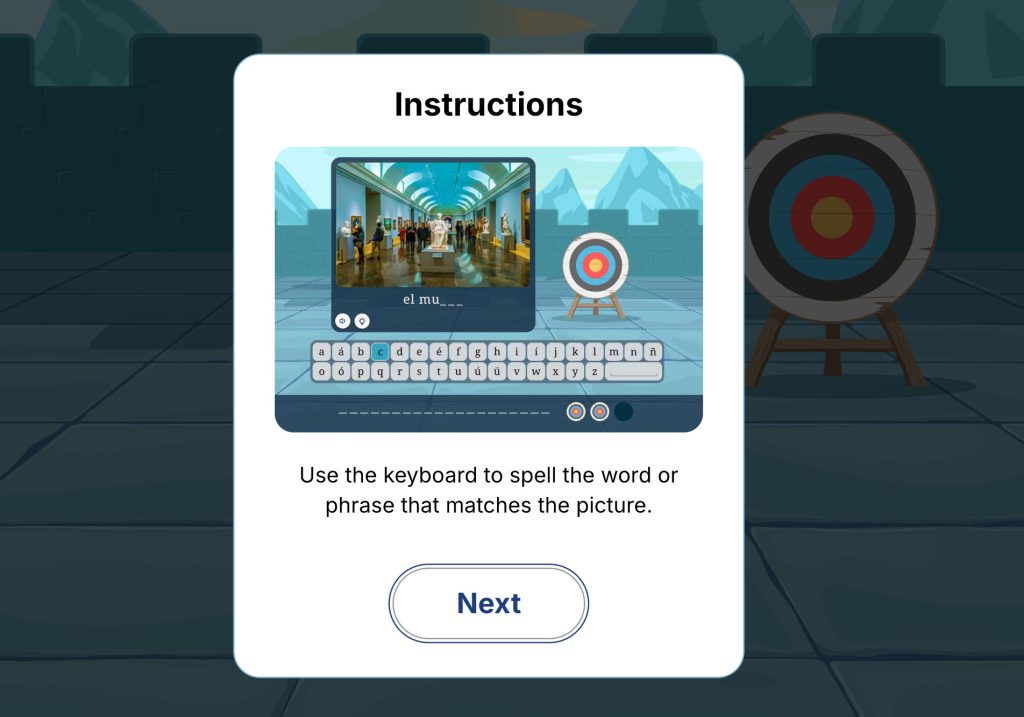
"You are on the rampart of a medieval castle. There is a circular archery target in front of you. To shoot an arrow at the target, you must answer questions by spelling a mystery word. Each question has an image with an audio description. On screen is a keyboard which you can use to type in the letters, if you have access to a physical keyboard, that will work too. There is a clue button which will reveal a missing letter. If you use a clue or guess a wrong letter, you will lose a life. You have three lives. The fewer mistakes you make, the more accurate your arrow will be."
Screen reader-only scene description